
Download WiFiCamera APK – Suntek WiFi Camera WiFi810, wireless camera app, Android app, free camera app, mobile camera viewer, remote camera control, Suntek WiFi810 app, wireless photo transfer, video recording app, mobile camera management
Overview
WiFiCamera is a dedicated mobile application designed exclusively for users of the Suntek WiFi Camera WiFi810. Developed by Shenzhen Suntek, the app enables wireless connectivity between the camera and Android devices, allowing users to capture, view, and manage multimedia content directly from their smartphones. The primary purpose of the software is to simplify the process of transferring photos and videos from the camera to mobile devices without the need for physical cables or memory cards. This makes it ideal for individuals who rely on the Suntek WiFi810 for surveillance, home monitoring, or casual recording in remote or hard-to-reach locations.
The app targets both casual users and those who require a straightforward method for managing camera content. Its focus on ease of use suggests it is particularly suitable for non-technical users seeking a hassle-free way to access recorded media. Real-world applications include monitoring home environments, capturing outdoor events, or reviewing security footage remotely. The developer did not provide additional information about the company’s broader product line or technical background beyond the app’s intended use.
Key Features & Capabilities
- Wireless Photo and Video Transfer – Users can capture images and videos directly from the Suntek WiFi Camera WiFi810 and transfer them wirelessly to their Android devices.
- Remote Camera Control – The app allows users to operate the camera remotely, enabling them to start recording, take snapshots, and adjust settings via their mobile device.
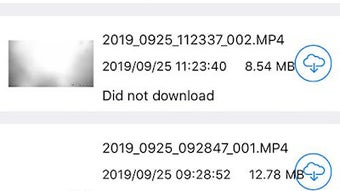
- Media Preview and Management – Users can preview captured content directly within the app and perform basic file operations such as downloading, viewing, and deleting files.
- Simple User Interface – Designed with usability in mind, the interface supports intuitive navigation, making it accessible even for users with minimal technical experience.
- Offline Access to Local Files – Once transferred, media files are stored locally on the device, allowing users to access them without an active connection to the camera.
These features streamline workflows for users who need to quickly retrieve or review recorded content. For example, a homeowner using the Suntek WiFi810 for security monitoring can instantly check footage from their phone during a suspicious event. Similarly, a user capturing outdoor footage can review and manage files on the go without returning to a computer.
User Interface, Workflow & Performance
The user interface of WiFiCamera appears to be structured around core functions: camera control, media preview, and file management. Navigation is likely linear and task-focused, with primary actions such as capture, playback, and transfer clearly labeled. The simplicity of the design suggests a low learning curve, which aligns with the app’s target audience of non-technical users.
Workflow efficiency is enhanced by direct integration with the Suntek WiFi810, minimizing steps between capturing media and accessing it on a mobile device. Users can initiate recording, view live previews, and download files in a few taps. However, exact performance details were not specified by the developer. General software behavior patterns suggest stable operation under normal conditions, but the app’s resource usage—such as CPU and RAM consumption—was not disclosed.
Stability and responsiveness may vary depending on network conditions and the camera’s signal strength. The developer did not provide information on crash rates, update frequency, or background performance. Users should expect consistent behavior when operating within the app’s intended scope.
Compatibility & System Requirements
WiFiCamera is designed for Android devices and requires a compatible version of the operating system to function. The app is available in version 1.0.0 and has a file size of 12.5 MB, indicating a lightweight installation. It is optimized for mobile use and does not require high-end hardware.
Platform compatibility information is limited to Android, with no details on specific device models or minimum OS versions. The developer did not specify exact system requirements, including RAM, processor, or storage needs. Users should ensure their device supports the necessary network protocols for wireless communication with the Suntek WiFi Camera WiFi810.
Installation is straightforward, and the app is available for free download. The developer did not provide information on cloud integration, multi-device support, or synchronization features.
Pros and Cons
Pros
- Free to download and use with no hidden costs
- Specifically tailored for Suntek WiFi Camera WiFi810 users
- Enables wireless transfer of photos and videos without cables
- Simple, intuitive interface suitable for beginners
- Supports remote control and real-time preview of camera content
Cons
- Only compatible with a single camera model (Suntek WiFi810)
- Limited to Android devices; no support for iOS or desktop platforms
- No information on advanced features like cloud backup or remote access over the internet
- Developer did not disclose system requirements or performance metrics
- App functionality is restricted to one specific hardware device
FAQ Section
Is WiFiCamera compatible with iOS devices?
WiFiCamera is designed exclusively for Android devices. There is no official support for iOS platforms at this time.
Can I use WiFiCamera without an internet connection?
Yes, the app can operate using a direct Wi-Fi connection between the Android device and the Suntek WiFi Camera WiFi810. No external internet connection is required for basic file transfer and control.
Does the app support cloud storage or file sharing?
The developer did not provide information on cloud integration or file-sharing capabilities. All file management is handled locally on the device.
How often are updates released for WiFiCamera?
Specific update frequency was not disclosed by the developer. Users are advised to check the official source for the latest version.
Is WiFiCamera safe to download and use?
As a free app developed by Shenzhen Suntek, WiFiCamera is intended for use with the Suntek WiFi Camera WiFi810. It is recommended to download the APK from trusted sources to ensure security and authenticity.
Final Thoughts + CTA
WiFiCamera delivers a focused and functional solution for users of the Suntek WiFi Camera WiFi810. Its core strengths lie in seamless wireless file transfer, remote control, and an accessible interface. While it lacks broader compatibility and advanced features, it excels within its defined scope. The app is ideal for individuals who prioritize simplicity and direct control over their camera’s media without the need for complex setups or additional software.
For Suntek WiFi810 owners seeking a reliable, free, and straightforward way to manage their recordings, WiFiCamera is a solid choice. It eliminates the need for memory cards and cables, offering a convenient alternative for on-the-go access to photos and videos.
Download WiFiCamera now






.png)
